Home / Architecture tools / Site analysis tools
Site analysis tools for architects

Site analysis tools for architects: which kind of tool for which drawing

A site analysis usually needs a context plan, sun and shadow, movement, climate and a 3D base model. No single tool does all of it, so most students combine two or three kinds of tool. This guide sorts them by the job they do. It is written by the team behind MapToNap, which is one of them.

Sorted by jobFree options firstWritten by MapToNap
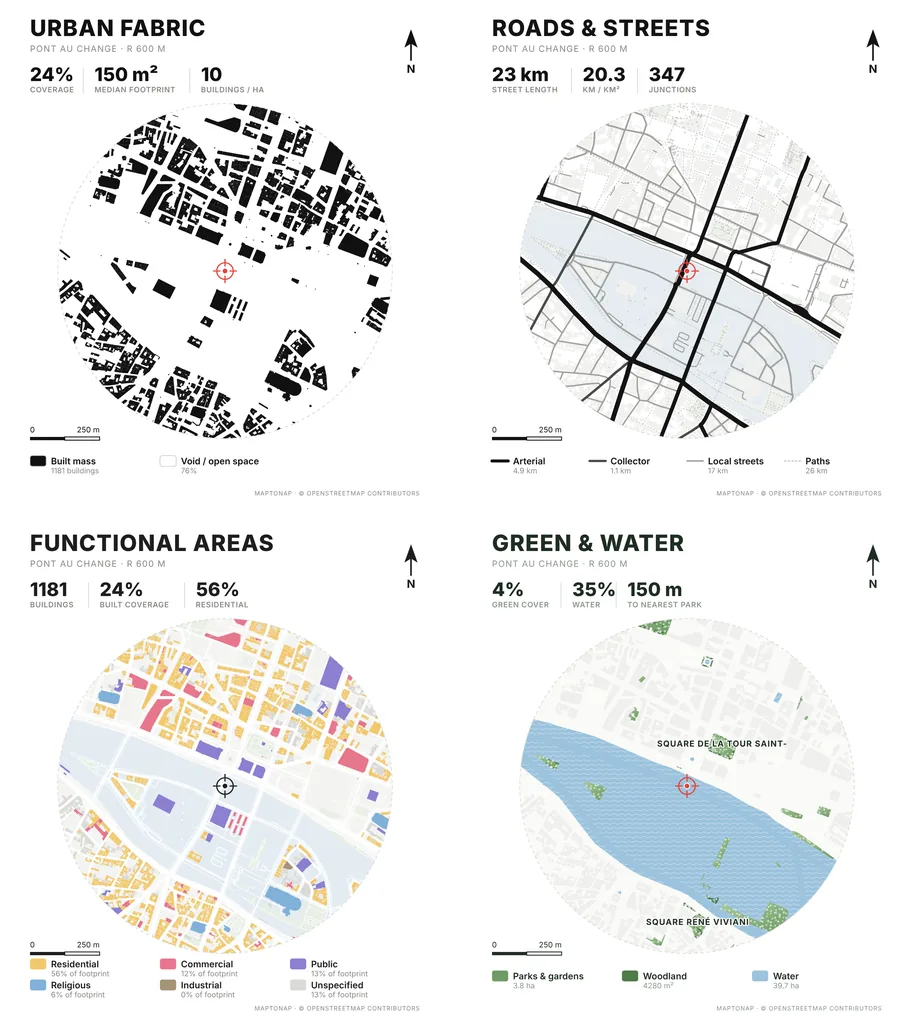
The four free MapToNap site analysis drawings for Pont au Change, Paris: urban fabric, roads and streets, functional areas, green and water
At a glance

Nine kinds of tool, one site

Kind of toolWhat you getGood to know
Open map dataStreets, buildings, land use and paths for almost every cityThe base under most of the other tools; free and open
Desktop GISAny map or spatial analysis you can build yourselfMost flexible; needs GIS skills and time
CAD context downloadsBuildings, roads and terrain as CAD filesGeometry to draw over, not analysis drawings
Sun position appsSun path, sunrise and sunset for a date and placeQuick checks; usually screenshots, not drawings
3D shadow viewersShadows of buildings moving through a day on a 3D mapBest for exploring; output is a live view
Map styling toolsClean basemaps for a location planStyles the map, does not analyse it
Street section editorsCross-sections of streets for movement studiesFor designing streets once the site is understood
AI map assistantsAnswers and charts from questions in plain languageSubscription; output is data and reports
MapToNapSite-analysis sheets from an address: figure-ground, streets, land use, green and water, sun, wind, noise, walking, urban growth, plus a 3D site modelFour drawings free, no sign-up; 30-day passes for the rest
A typical combination

How the kinds of tool fit together on one project

Context and base model

Open map data underneath; a CAD context download if you only need geometry, or MapToNap for drawn sheets and a Rhino site model.

Sun, shadow and climate

A sun app or a 3D shadow viewer to explore; MapToNap for sun path, sun and wind axonometric, wind and climate sheets in board style.

Movement and streets

MapToNap for street networks, walking, transit and noise; a street section editor to design the streets themselves; desktop GIS for anything custom.

More sheets

Beyond the four free drawings

The image at the top shows the four drawings you get without signing up (exports carry a watermark). Pro adds sheets like these, rendered here for the Paris sample.

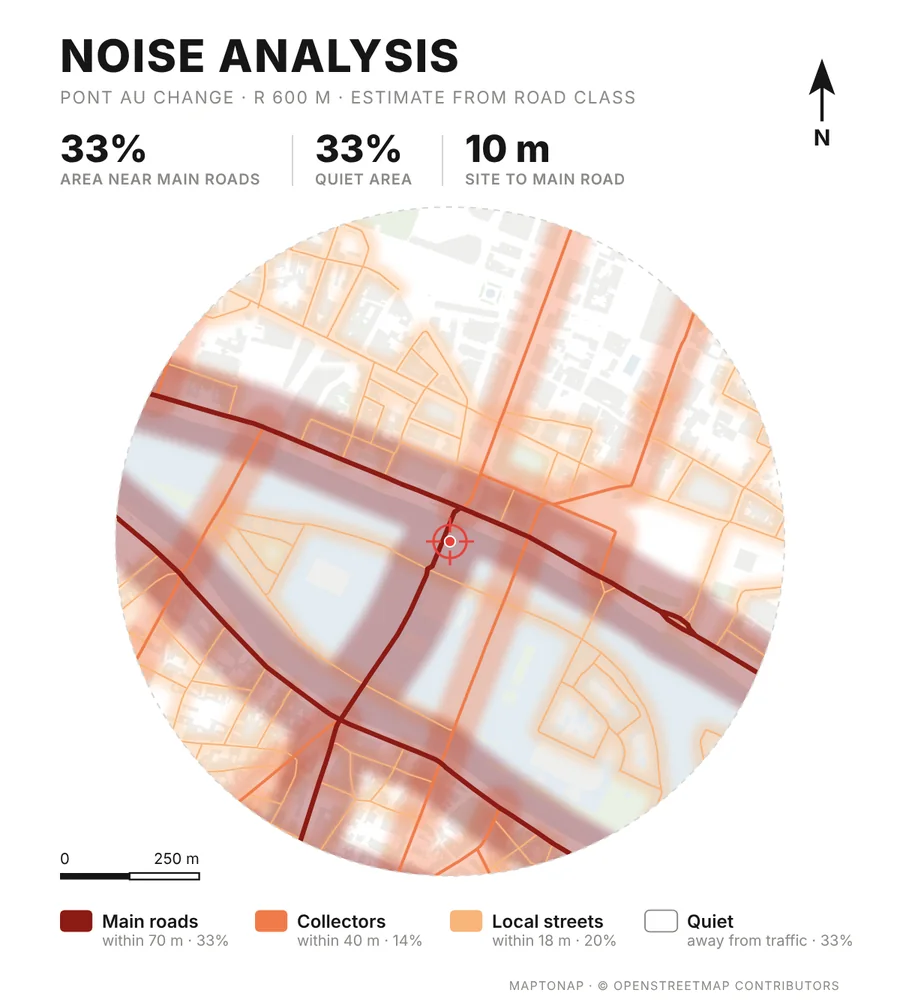
Noise analysis sheet for Pont au Change, Paris
Noise analysisOne of the Pro sheets: road noise by street type.
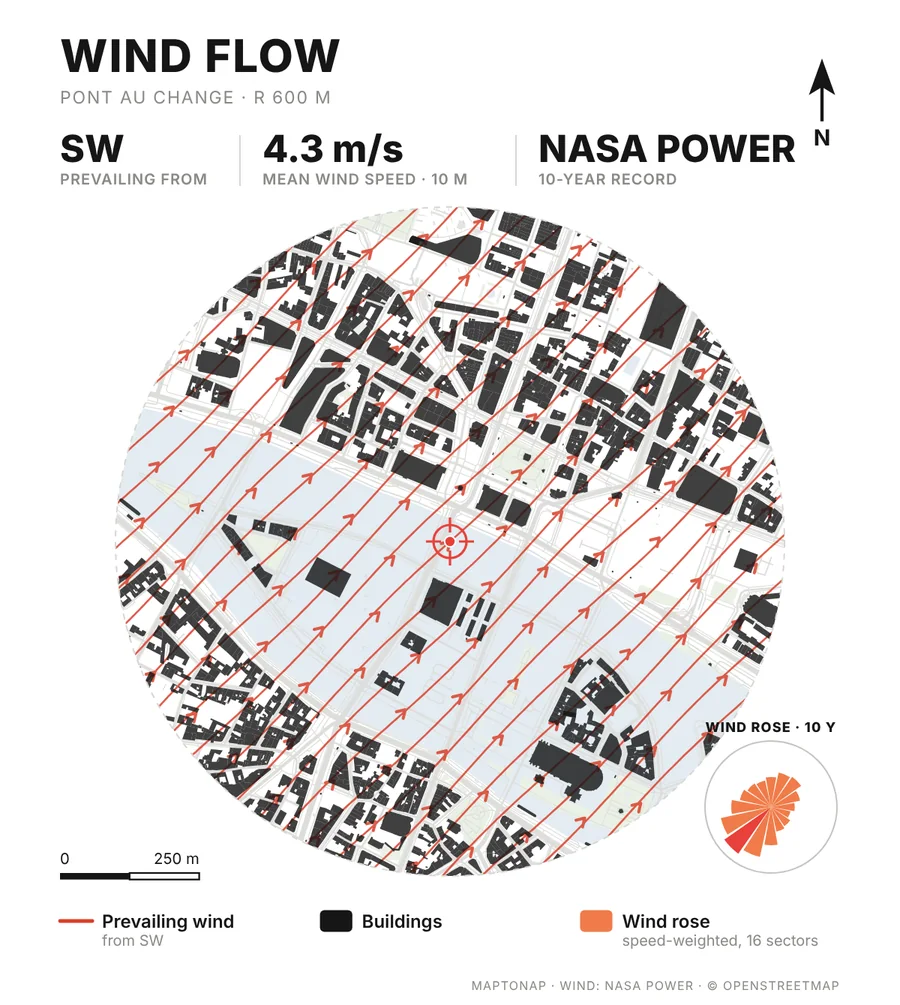
Wind flow sheet for Pont au Change, Paris
Wind flowPro sheet: prevailing wind and wind rose from the site’s record.
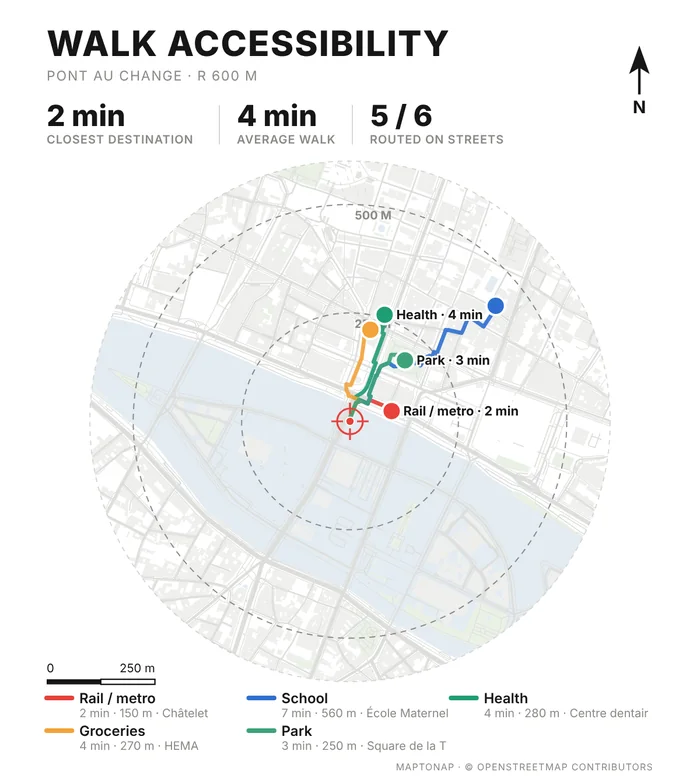
Walk accessibility sheet for Pont au Change, Paris
Walk accessibilityPro sheet: walking routes to everyday destinations.

Map data © OpenStreetMap contributors, available under the Open Database Licence. The drawings are MapToNap output for the Paris sample (Pont au Change), shown as flattened previews.

Frequently asked questions

Clear answers before you start

What is the best free site analysis tool?

It depends on the drawing you need. For raw geometry, a CAD context download; for sun checks, a sun position app; for full control, desktop GIS. For ready-made site-analysis sheets from an address, MapToNap draws four for free. Most projects combine two or three kinds of tool.

Do these tools work outside the US and Europe?

Tools built on open map data, MapToNap included, work worldwide, but the result depends on how well the area is mapped, which varies by city.

Do I need GIS skills?

Only for desktop GIS. Browser tools such as MapToNap need no GIS knowledge.

Can I get editable drawings rather than screenshots?

Yes. MapToNap exports every sheet as editable SVG and vector PDF, and the 3D site model as Rhino 3DM, OBJ or GLB with Max. CAD downloads and GIS exports are also editable.

Is MapToNap an AI tool?

No. The drawings are computed from map data and geometry, so you can edit every line, colour and label.